
Blogs, Bevel Gear
Why Do Bevel Gears Overheat After Installation?
Jul
After new or replacement bevel gears are installed, an unusual rise in operating temperature can raise concerns about material, heat treatment, or machining quality. However, overheating does not always mean that the gears themselves are defective.
Backlash, tooth contact, mounting distance, shaft alignment, mating-gear condition, and operating load all affect how a bevel gear pair runs. For this reason, Wenlio reviews overheating problems by checking the complete gear pair and its installed relationship before recommending adjustment, measurement, or replacement.
Quick Answer: Why Do Bevel Gears Overheat?
Bevel gears often overheat after installation because the backlash is too small, the tooth contact is incorrect, or the pinion and gear are not positioned at the correct mounting distance.
Shaft misalignment, a worn mating gear, excessive load or speed, unsuitable lubrication, and excessive bearing preload may also increase operating temperature. Troubleshooting should begin with the bevel gear pair and its installation before moving to secondary system factors.
Why Should Abnormal Temperature Rise Be Checked?
Some temperature rise is normal during operation. A bevel gear pair does not run without friction, and the surrounding transmission components also generate heat.
The problem should be investigated when:
- The temperature keeps rising instead of becoming stable
- The new gear pair runs hotter than the previous set
- Heating appears soon after installation
- Noise or vibration increases at the same time
- Tooth surfaces show scoring, edge contact, or unusual wear
- The temperature changes sharply between no-load and loaded operation
Continued operation under these conditions may increase tooth-surface wear and further change the contact condition. The first task is therefore to confirm whether the heat is abnormal and identify where it begins.
First Confirm: Are the Bevel Gears Really Overheating?
Before changing the gear position or replacing any part, record the operating conditions.
Check:
- Where the temperature was measured
- The ambient temperature
- The no-load temperature
- The loaded temperature
- The running time before the temperature stabilized
- The speed and load during the test
- Whether noise, vibration, or tooth marks changed after installation
There is no single temperature limit that applies to every bevel gear application. Acceptable temperature depends on the machine design, speed, load, lubrication method, and measurement position.
The most useful comparison is usually the same machine under the same operating conditions before and after the gear installation.
How Backlash Makes Bevel Gears Overheat
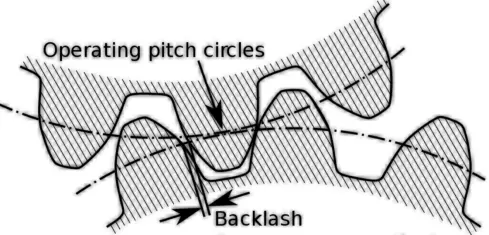
Bevel gear backlash that is too small can make the gear mesh too tight. As the gear pair and shafts warm up, thermal expansion may reduce the available clearance further.
This can increase sliding and friction between the tooth surfaces. In more serious cases, the gears may become noisy, difficult to turn, or show local scoring.
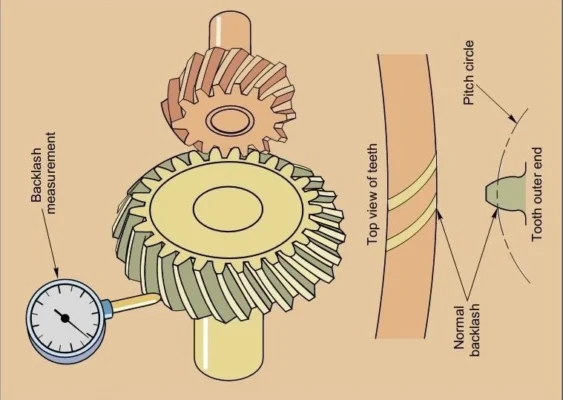
For bevel gears, backlash is often affected by the axial position of the pinion and gear. Adjusting shims or moving one component may change both backlash and tooth contact.
Backlash should therefore not be checked as an isolated value. After adjustment, the contact pattern should also be reviewed.
How Poor Tooth Contact Makes Bevel Gears Overheat
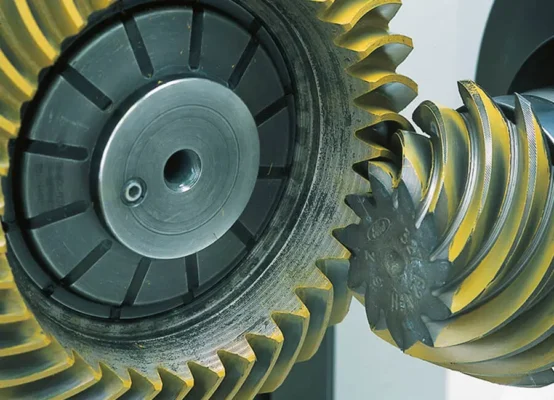
A bevel gear pair should carry load over a suitable area of the tooth surface. If contact is concentrated near the toe, heel, tip, root, or edge, the load may be carried by a much smaller area.
This can increase local pressure and sliding, which may lead to:
- Higher operating temperature
- Noise during loaded operation
- Edge wear
- Scoring or polishing marks
- Uneven wear between the two tooth flanks
A gear pair may still rotate smoothly by hand while producing poor contact under load. For this reason, free rotation alone does not confirm that the installation is correct.
The contact pattern should be checked together with backlash and the specified mounting position.
How Mounting Distance and Alignment Cause Overheating
Bevel gears are sensitive to the relative position of the pinion and gear. A small change in axial position can move the contact pattern and change the backlash.
Possible installation-related causes include:
- Incorrect pinion mounting distance
- Incorrect gear position
- Wrong shim thickness
- Shaft misalignment
- Incorrect shaft angle
- Worn bearing seats
- Housing locating surfaces that are damaged or contaminated
The gear pair should be inspected in the actual installed relationship. Checking only the individual gear dimensions may not reveal a mounting error.
When the mounting distance is changed, both backlash and contact pattern should be checked again.
Other Reasons Bevel Gears May Overheat
A New Gear Is Paired With a Worn Mating Gear
A new bevel gear may not run correctly against a mating gear that already has uneven wear, surface damage, or a changed contact pattern.
For matched bevel gear sets, replacing only one member may also change the intended pairing relationship. The condition and identification of both gears should be confirmed before a single replacement is ordered.
Load or Speed Is Higher Than Before
The replacement gears may be correct, but the machine may now be operating under different conditions.
Check whether:
- Motor speed has increased
- Applied torque is higher
- Shock loading has become more frequent
- The operating cycle is longer
- The machine starts and stops more often
- The system was tested at full load without an initial check
Higher speed and load can increase heat even when the gear pair is installed correctly.
Tooth Surfaces Have Burrs or Local Damage
Burrs, handling damage, raised edges, or abnormal marks may disturb the intended contact.
Before installation, inspect the tooth surfaces, bores, mounting faces, and locating features. Do not remove material from the tooth surface without confirming the effect on the gear geometry.
Lubrication or Bearing Settings Are Incorrect
Lubrication and bearing preload can contribute to heating, but they should not replace the main bevel gear checks.
Confirm that the specified lubricant and amount are used, and that the bearings are installed with the required clearance or preload. If heat is concentrated near a bearing position rather than the gear mesh, the bearing setting may need separate review.
In What Order Should Bevel Gear Overheating Be Checked?
The following order keeps the investigation focused on the bevel gear installation.
| Step | Check | What to Confirm |
| 1 | Temperature and operating conditions | Measurement position, ambient temperature, running time, speed, and load |
| 2 | Bevel gear backlash | Whether the clearance matches the drawing or assembly requirement |
| 3 | Tooth contact pattern | Contact position, area, and consistency on both flanks |
| 4 | Mounting distance | Pinion position, gear position, and shim arrangement |
| 5 | Shaft and housing alignment | Shaft angle, bearing seats, locating surfaces, and assembly condition |
| 6 | Mating gear condition | Wear, damage, matching marks, and whether the pair belongs together |
| 7 | Load and speed | Whether the actual conditions exceed the original application |
| 8 | Secondary factors | Lubrication, bearing preload, and surrounding heat dissipation |
Only change one setting at a time. If several parameters are changed together, it becomes difficult to determine which change affected the temperature.
After changing backlash, mounting distance, or shims, repeat the contact-pattern check.
What Should Be Checked Before Replacing the Bevel Gears?
Overheating does not automatically mean that another new gear set is required.
Before placing a replacement order, confirm:
- Whether both gears match the correct drawing revision
- Whether the pair was originally manufactured as a matched set
- Whether the mating gear is worn or damaged
- Whether the mounting distance is correct
- Whether the original shims were reused without verification
- Whether the shaft and bearing positions have changed
- Whether the operating load or speed has increased
- Whether the current gear damage is the cause or the result of another problem
A worn sample should not be copied without review. Wear may have changed the tooth surface, mounting features, or other critical dimensions.
What Information Should Be Sent to the Gear Supplier?
A supplier needs more than one photo of the damaged tooth surface. The following information makes the review more useful.
| Information | Recommended Details |
| Gear identification | Drawing, part number, tooth count, gear type, and design revision |
| Gear-pair information | Photos of both gears, ratio, spiral hand if applicable, and matching marks |
| Installation data | Mounting distance, backlash, shim thickness, and shaft arrangement |
| Contact evidence | Contact-pattern photos from the drive and coast flanks |
| Temperature records | Measurement position, ambient temperature, running time, no-load and loaded temperatures |
| Operating conditions | Speed, torque, load type, and operating cycle |
| Gear condition | Photos of wear, scoring, edge contact, burrs, or other marks |
| Mating-part condition | Wear or damage on the mating gear, bearings, shafts, and locating surfaces |
| Change history | What was replaced, adjusted, or changed before the overheating started |
This information helps the supplier decide whether the next step should be an installation adjustment, gear-pair inspection, sample measurement, drawing review, or replacement project.
How Wenlio Reviews Bevel Gear Overheating Problems
Wenlio begins by reviewing the gear type, mating relationship, drawing revision, and installation conditions.
The next step is to compare:
- Backlash
- Tooth contact
- Mounting distance
- Shaft and housing position
- Mating-gear condition
- Actual speed and load
Lubrication and bearing information are then checked as supporting factors.
When the available information is incomplete, the review may require old-part inspection, mating-gear measurement, confirmation of critical mounting dimensions, or prototype and matched-pair verification.
The purpose is not to determine the cause from one image. It is to narrow down the possible sources of the heat before recommending adjustment, measurement, or replacement.
FAQ
Does Bevel Gear Overheating Always Mean a Manufacturing Defect?
No. Incorrect backlash, poor tooth contact, mounting-distance errors, shaft misalignment, a worn mating gear, or changed operating conditions may also cause overheating.
Can Small Backlash Cause Bevel Gears to Overheat?
Yes. Backlash that is too small may increase tooth friction, especially after the gear pair expands during operation.
Can the Contact Pattern Be Wrong Even When Backlash Is Correct?
Yes. Backlash and tooth contact are related, but one acceptable backlash value does not automatically prove that the contact position is correct.
Should Both Bevel Gears Be Replaced Together?
It depends on the gear design and condition. Matched sets and pairs with a heavily worn mating gear may require both members to be reviewed together.
Can a Supplier Identify the Cause From Photos Alone?
Usually not. Photos are helpful, but backlash, contact-pattern, mounting-distance, temperature, and operating-condition records are also needed.
Conclusion
When bevel gears overheat after installation, review the complete gear pair and its installed relationship. Check the operating temperature, backlash, tooth contact, mounting distance, shaft alignment, mating-gear condition, load, and speed, while treating lubrication and bearing settings as supporting factors.
If the cause remains unclear, Contact us and send the gear drawings, photos, contact-pattern records, installation dimensions, temperature data, and operating conditions for review.
